


KQL in SecOps (1) - Why Every Security Analyst Must Learn KQL
- GK
- Dec 22, 2025
- 6 min read
Updated: Jan 16

In today’s digital world, security operations centers (SOCs) face an unprecedented challenge: the sheer volume and variety of data generated across networks, endpoints, cloud workloads, and applications. Each login, network flow, file access, or system event contributes to billions of data points that must be analyzed to detect threats in real-time.
For security teams, the difference between catching a threat early or missing it entirely often comes down to the ability to query and analyze logs efficiently. Enter Kusto Query Language (KQL)—a powerful, purpose-built language that has become the backbone of Microsoft Sentinel, Microsoft’s cloud-native SIEM (Security Information and Event Management) and SOAR (Security Orchestration, Automation, and Response) platform.
This first post in our KQL in Security Operations Series will explore:
What KQL is
Why it is critical for SOCs
How analysts use it daily
Common misconceptions and best practices
By the end of this post, you’ll understand why KQL is the language that powers modern security operations, and why every SOC analyst should master it.
What Is Kusto Query Language (KQL)?
Kusto Query Language, commonly known as KQL, is a read-only query language designed to explore and analyze large volumes of structured, semi-structured, and time-series data. It was developed by Microsoft for Azure Data Explorer, and it forms the query backbone of multiple Microsoft security and observability products, including:
Microsoft Sentinel
Azure Monitor Logs
Microsoft Defender for Endpoint
Log Analytics Workspaces
Unlike traditional SQL, KQL is optimized for interactive exploration and high-performance queries across massive datasets. Its syntax is intuitive for analysts, using pipes (|) to pass data between operations, making queries readable and modular.
Why KQL Is Vital for Security Operations
In modern SOCs, analysts need more than static dashboards or vendor-provided alert rules. They need flexible, dynamic, and precise ways to interrogate data, and KQL provides exactly that.
With KQL, security teams can:
Search billions of events in seconds – enabling fast detection of anomalies
Filter, summarize, and correlate telemetry – across endpoints, users, and cloud resources
Perform threat hunting – proactively look for threats before alerts are generated
Build and fine-tune detection rules – reducing false positives
Create dashboards and workbooks – visualizing security trends and SOC metrics
In short, KQL is the operational language of modern SOCs. Without KQL, even the most sophisticated SIEM cannot unlock the intelligence hidden in raw logs.
How Microsoft Sentinel Uses KQL
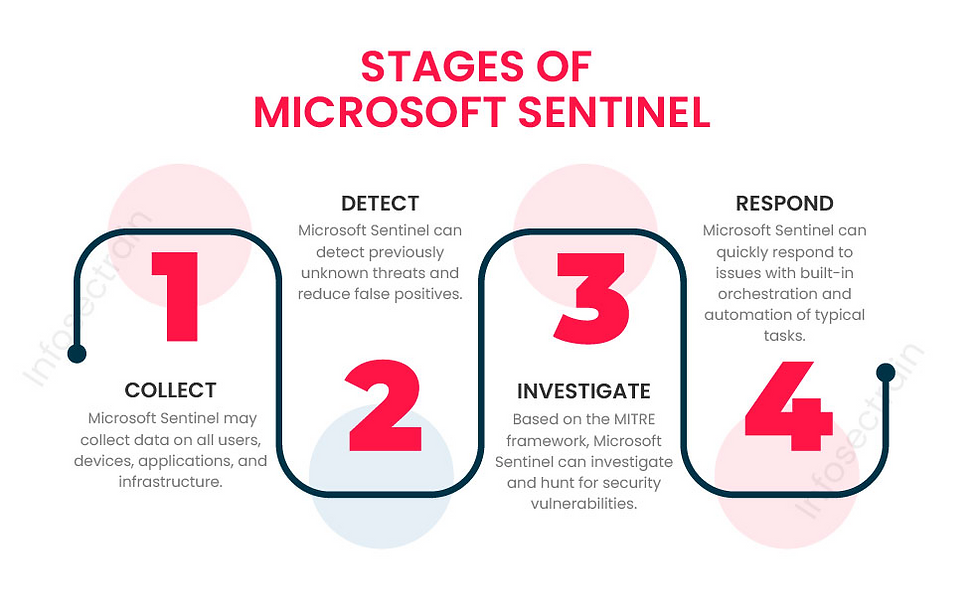
Microsoft Sentinel is a cloud-native SIEM and SOAR platform. At its core, Sentinel ingests data into Log Analytics Workspaces, which store events from various sources:
Windows and Linux hosts – security events, process activity, login events
Azure and cloud workloads – activity logs, configuration changes, audit data
Endpoints and network devices – firewall logs, network connections
Identity systems – Azure AD sign-ins, audit logs, MFA activity
Third-party and custom connectors – SaaS applications, cloud platforms, or custom telemetry
KQL is the primary tool for querying this data. Every alert, investigation, dashboard, or automated response in Sentinel relies on a KQL query under the hood.
Put simply: if you can’t write KQL, you can’t fully leverage Sentinel.
Daily Use Cases for KQL in a SOC
Let’s look at some practical examples of how KQL is used in daily security operations.
1. Alert Investigation
When an alert fires in Sentinel, analysts must quickly determine:
Is this alert valid or a false positive?
Has this activity occurred before?
What other activity is related to this alert?
Example query: Retrieve recent alerts:
SecurityAlert
| where TimeGenerated > ago(24h)
| project TimeGenerated, AlertName, AlertSeverity, CompromisedEntity
This query provides a quick snapshot of alerts in the last 24 hours, including severity and affected systems. Analysts can then drill down to investigate individual alerts.
2. Threat Hunting
Threat hunting is a proactive process that assumes threats may already exist in the environment. Unlike reactive alert investigation, hunting is exploratory and requires dynamic queries.
Example: Hunting for failed sign-ins (possible brute-force attempts):
SigninLogs
| where ResultType != 0
| summarize FailedLogins = count() by UserPrincipalName
| where FailedLogins > 10
This query identifies accounts with more than 10 failed login attempts in the observation window—a potential indicator of a brute-force attack.
Other hunting examples include:
Rare administrative logins
Unusual PowerShell or command-line activity
Suspicious network connections
3. Detection Engineering
SOC teams also create custom detection rules in Sentinel using KQL. This enables detections to be tailored to the specific environment, reducing false positives and improving accuracy.
Example: Detect suspicious PowerShell usage:
SecurityEvent
| where EventID == 4688
| where ProcessName == "powershell.exe"
| where CommandLine contains "EncodedCommand"
Once tested, this query can be scheduled as an analytics rule to generate alerts automatically.
4. Incident Investigation
After confirming a threat, analysts use KQL to reconstruct attacker activity across users, devices, and time.
Example: Track logon activity across multiple computers:
SecurityEvent
| where EventID == 4624
| summarize Logons = count() by Account, Computer, bin(TimeGenerated, 30m)
This query allows analysts to visualize login patterns, detect lateral movement, and determine the scope of an incident.
5. Data Correlation and Enrichment
High-fidelity detections often require combining data from multiple sources. KQL allows analysts to join tables and enrich logs with contextual data.
Example: Enrich sign-in logs with identity information:
SigninLogs
| join kind=leftouter IdentityInfo on UserPrincipalName
Enrichment enables analysts to filter high-risk users, specific departments, or privileged accounts, improving the accuracy of hunting and alerting.
Common Misconceptions About KQL
Even experienced SOC teams sometimes misunderstand KQL.
Let’s debunk a few myths:
❌ “KQL is only for engineers.”Truth: KQL is designed for analysts. Its syntax is intuitive and optimized for exploration.
❌ “I only need basic queries to get value.”Truth: While basic queries help, mastering advanced KQL enables threat hunting, incident reconstruction, and custom detections.
❌ “Sentinel works out of the box.”Truth: Sentinel is powerful, but its true potential emerges when analysts write custom KQL queries for detections, hunting, and dashboards.
Getting Started With KQL in Microsoft Sentinel
For those new to KQL, here’s a simple roadmap:
Understand your data – Explore tables like SecurityEvent, SigninLogs, AuditLogs, and SecurityAlert.
Start with time filters – Always narrow queries by TimeGenerated to improve performance.
Project only what you need – Use project to limit columns.
Summarize events – Use summarize and bin() to group events by time or user.
Iteratively refine queries – Test and tweak your queries before turning them into alerts or dashboards.
Example: Combining filtering, projection, and summarization:
SecurityEvent
| where EventID == 4625
| where TimeGenerated > ago(24h)
| project TimeGenerated, Account, Computer
| summarize FailedAttempts = count() by Account, bin(TimeGenerated, 1h)
| where FailedAttempts > 5
This query highlights accounts experiencing multiple failed logins, a common brute-force indicator.
Why Mastering KQL Is a SOC Force Multiplier
Security analysts with KQL expertise gain several advantages:

Faster incident investigations – Quickly pinpoint affected users, devices, or applications
Proactive threat detection – Identify stealthy threats before they generate alerts
Reduced false positives – Tailor detection rules to your environment
Enhanced reporting and visualization – Build custom dashboards and SOC metrics
Cross-domain correlation – Connect endpoint, network, identity, and cloud telemetry
In short, KQL proficiency transforms raw logs into actionable intelligence, making SOC analysts more effective.
Looking Ahead: What to Expect in Part 2
Next month, we’ll dive deeper into KQL fundamentals, including:
How to filter logs effectively
Selecting and projecting fields
Sorting and limiting results
Avoiding common beginner mistakes
By the end of Part 2, you’ll be able to write your first meaningful KQL queries in Microsoft Sentinel, laying the foundation for threat hunting and detection engineering.
Conclusion
KQL is more than a query language—it is the lifeblood of modern security operations. From investigating alerts to hunting threats and building detections, KQL empowers SOC teams to make data-driven decisions and respond to threats faster.
If you are a SOC analyst, engineer, or security professional working with Microsoft Sentinel, investing time in learning KQL is essential.
Over the coming months, this series will guide you from beginner queries to advanced hunting, investigation, and detection engineering techniques, helping you maximize the value of Sentinel for your organization.
Stay tuned for Part 2, where we’ll take the first hands-on steps with KQL, teaching you how to filter, project, and sort security data effectively.
✅ Key Takeaways from Part 1
KQL is the core query language in Microsoft Sentinel and other Microsoft security products.
Every SOC operation—alert investigation, threat hunting, incident response—relies on KQL.
Learning KQL transforms a reactive SOC into a proactive, data-driven security operation.
Start simple: focus on tables, time filters, and projections before advancing to joins, enrichment, and complex detections.
Found this useful?


Comments